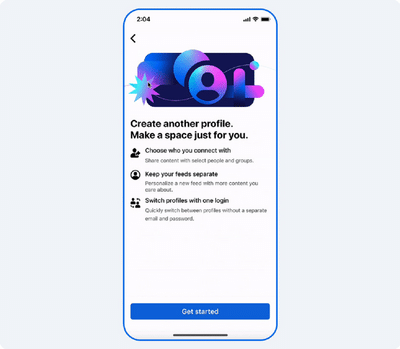
Facebook Introduces Feature to Create Multiple Profiles with One Login
Meta has introduced a new functionality on Facebook that allows users to create multiple personal profiles within a single account. This feature is designed to give users more flexibility in managing different social circles, interests, and communities without the need to open several separate Facebook accounts.
With the introduction of this feature, Facebook users can now create up to four additional profiles linked to their main account. Each profile operates independently and comes with its own friend list, feed, groups, and page interactions.
The idea behind the feature is to help users organize their digital presence more efficiently. For instance, someone might want to maintain one profile for family and close friends, another for professional connections, and another dedicated to hobbies or community groups.
Despite having multiple profiles, everything remains connected to the same login credentials, making it easier for users to manage their activities across profiles.
However, users should note that the primary Facebook profile cannot be removed individually. If someone wishes to delete their primary profile, they must delete the entire Facebook account.
Below is a detailed guide explaining how users can create and switch between multiple Facebook profiles.
Understanding Facebook’s Additional Profiles Feature
Additional profiles are secondary identities created under an existing Facebook account. These profiles help users interact with different audiences without mixing content across their main network.
Each additional profile comes with its own:
- Separate friends list
- Independent News Feed
- Ability to follow different Pages and groups
- Unique profile settings and activity
Although these profiles appear independent, they are all managed through the same main Facebook account.
This means users can maintain multiple digital identities while avoiding the need to remember separate login details.
Steps to Create Another Facebook Profile
If you want to add extra profiles to your Facebook account, follow these steps carefully.
Step 1: Log In to Facebook
Open the Facebook mobile application or visit the Facebook website on your computer. Sign in using your existing account credentials.
Step 2: Go to the Menu Section
After logging in, tap or click on the Menu icon located in the top-right corner of the screen.
Step 3: Select “Create Another Profile”
In the menu options, look for the option labeled “Create another profile.”
In some cases, the option might appear as “Create Facebook profile” next to your profile name.
Step 4: Begin the Setup Process
Once you click on the option, Facebook will guide you through the setup. Tap “Get Started” to proceed.
Step 5: Choose Profile Name and Username
You will be required to select a profile name and a unique @username for the new profile.
Make sure the name complies with Facebook’s community guidelines and naming policies.
Step 6: Follow the On-Screen Instructions
Continue following the instructions displayed on the screen. After completing the process, the new profile will be successfully created.
Step 7: Create More Profiles if Needed
If you want to add more profiles, repeat the same steps. Facebook currently allows users to create up to four additional profiles.
How to Switch Between Facebook Profiles
Once you have created multiple profiles, switching between them is simple.
Step 1: Open the Menu
While using Facebook, tap the Menu icon in the top-right corner.
Step 2: Access the Profile Switcher
Next to your name, you will see a dropdown arrow (▼).
Step 3: Select Your Desired Profile
Tap on the profile you want to use. Facebook will immediately switch to that profile, showing its unique feed, friends list, and settings.
Users can switch between profiles whenever needed.
Important Points to Remember
Before using multiple profiles on Facebook, keep the following points in mind:
- The main Facebook profile cannot be deleted independently.
- All profiles are controlled through one login account.
- Facebook’s Community Standards apply to every profile.
- Any violation committed by one profile may affect the entire account.
Benefits of Having Multiple Facebook Profiles
The multiple profile feature offers several advantages for users who want better control over their social media presence.
Some benefits include:
- Separating personal and professional interactions
- Maintaining dedicated profiles for hobbies, gaming, or communities
- Managing different friend groups without overlap
- Keeping social feeds organized and relevant
This feature is especially helpful for users who participate in multiple online communities and want to maintain different identities within each space.
Final Thoughts
Facebook’s additional profile feature makes it easier for users to manage different social circles while using just one account and one login. By allowing up to four extra profiles, Meta is giving users more control over how they interact on the platform.
By following the steps mentioned above, anyone can easily create and manage multiple Facebook profiles, helping them keep their online life more structured, personalized, and organized.
Contact to : xlf550402@gmail.com
Copyright © boyuanhulian 2020 - 2023. All Right Reserved.