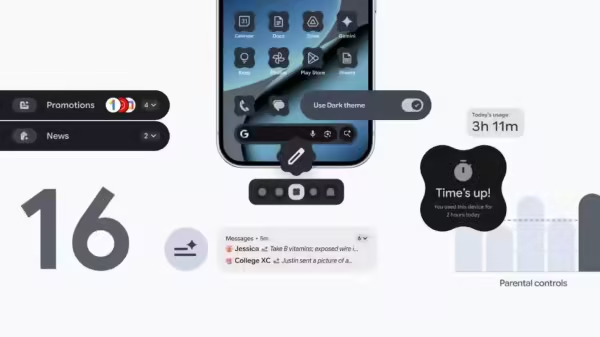
Google’s Android 16 Update For Pixel Users: Tech giant Google has rolled out the second Android 16 update of 2025, introducing new accessibility features for the first time. The update, which is first coming to Pixel devices, marks a major change in how Android updates are delivered, as the company is shifting from one annual update to more frequent releases.
The Android 16 update brings AI-powered notification tools, expanded customization options, and streamlined parental controls. Notably, the non-Pixel smartphones will receive Android 16 according to their manufacturers’ timelines.
Android 16 Update For Pixel Users: What’s New
Add Zee News as a Preferred Source
The new Android 16 update brings several new features that make using a phone simpler and more helpful. It now includes AI-powered notification summaries that turn long messages and group chats into short, easy-to-read notes, so you don’t have to scroll through everything.
There is also a new Notification Organizer that automatically groups and silences less important alerts like promotions, news, and social updates. Android 16 also gives users more ways to customize their phones with new icon shapes, themed icons, and the ability to darken apps that don’t support dark mode.
For families, a new Parental Controls section in Settings lets parents manage their child’s phone use by setting daily screen time limits, controlling which apps can be used, and creating bedtime schedules.
These controls are protected by a PIN and can be managed directly from the child’s device. Overall, Android 16 makes phones easier to use, more personal, and safer for kids. (Also Read: YouTube ‘Recap’ Feature Launched: Check Top Trends, Podcasts, Songs, And Most-Watched Creators of 2025; Here’s How To View It)
Google’s New Android Features
Google is also introducing some new Android features that work even if you are not using Android 16. One of them is a beta feature called “Call Reason,” which lets you mark a call to your saved contacts as “urgent,” so they know it’s important. Another new feature is “Expressive Captions,” which adds emotion tags like (sad) or (joyful) to video messages or social media posts, helping you understand the tone of what someone is saying.
Chrome Gets Smarter With Better Pinned Tabs
Google has also improved Chrome by making pinned tabs work just like they do on a computer, so your favorite pages stay at the front and are easy to return to. The “Circle to Search” tool is also getting better, allowing you to search anything on your screen by circling, highlighting, scribbling, or tapping. And now, you don’t even need to touch your phone to use Voice Access. You can simply say, “Hey Google, start Voice Access,” and control your phone with your voice.
Contact to : xlf550402@gmail.com
Copyright © boyuanhulian 2020 - 2023. All Right Reserved.